Cílem tohoto článku je rozchodit měření teploty pomocí čidla UWM DS18B20 ( koupil jsem ho zde za 28 Kč, je to čínský klon originálního Dallas DS18B20 ). Komunikuje po sběrnici 1Wire (česky jednodrát) a deklarovaná přesnost je 0.2 °C. Má v sobě analogově digitální převodník a hodnotu teploty posílá v digitální formě a tudíž není potřeba ji porovnávat s nějakým nepřesným referenčním napětím jako třeba u Pica.
Datasheet originálního čidla od firmy Maxim Integrated, datasheet čínského klonu od firmy UMW
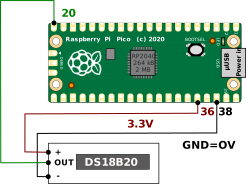
Čidlo má tu pěknou vlastnost, že na sběrnici 1Wire jich můžeme mít několik a můžeme s nimi komunikovat nezávisle. Každé čidlo má svoji "hardwarowou adresu". K zapojení čidla nám stačí 3 dráty (Možná by to šlo jenom se dvěma dráty a parazitním napájením po datové lince, ale nezkoušel jsem to, podle datasheetu to jde).
Schéma zapojení
Kód
$ mkdir teplota4
$ cd teplota4
$ mkdir modules
$ cd modules
$ git clone https://github.com/adamboardman/pico-onewire
$ cd ..
Knihovna Raspberry Pi Pico One Wire Library od Adama Boardmana je psána v C++, což celkem nevadí, protože to je programovací jazyk který vyšel z C.
Jenom musí mít náš program s funkcí main() příponu .cpp, aby projekt překládal C++ překladač a ne C překladač, protože ten některým konstrukcím z knihovny (např. class) nerozumí.
Mixování C++ a C kódu popíšu v jiném článku.
#include <stdio.h>
#include "pico/stdlib.h"
#include "hardware/gpio.h"
#include "modules/pico-onewire/api/one_wire.h"


int main() {
    stdio_init_all();
    One_wire one_wire(15); //GP15 - Pin 20 on Pi Pico
    one_wire.init();
    rom_address_t address{};
    while (true) {
        one_wire.single_device_read_rom(address);
        printf("Device Address: %02x%02x%02x%02x%02x%02x%02x%02x\n", address.rom[0], address.rom[1], address.rom[2], address.rom[3], address.rom[4], address.rom[5], address.rom[6], address.rom[7]);
        one_wire.convert_temperature(address, true, false);
        printf("Temperature: %3.1foC\n", one_wire.temperature(address));
        sleep_ms(1000);
    }
    return 0;
}cmake_minimum_required(VERSION 3.13)
# initialize the SDK based on PICO_SDK_PATH
# note: this must happen before project()
include(pico_sdk_import.cmake)
project(teplota4)
# set(CMAKE_C_STANDARD 11)
# initialize the Raspberry Pi Pico SDK
pico_sdk_init()
# rest of your project
add_executable(teplota4
ds18b20_test.cpp
)
add_subdirectory(modules/pico-onewire)
target_link_libraries(teplota4 pico_stdlib pico_one_wire)
pico_enable_stdio_usb(teplota4 1)
pico_enable_stdio_uart(teplota4 0)
# create map/bin/hex/uf2 file in addition to ELF.
pico_add_extra_outputs(teplota4)$ cd teplota4
$ mkdir build
$ cd build
$ cmake ..
$ make -j4Device Address: 28e89944d4ee250e
Temperature: 22.9oC
Device Address: 28e89944d4ee250e
Temperature: 22.9oC
Device Address: 28e89944d4ee250e
Temperature: 22.9oC
Device Address: 28e89944d4ee250e
Temperature: 22.9oC
Device Address: 28e89944d4ee250e
Temperature: 22.9oC
Device Address: 28e89944d4ee250e
Temperature: 22.9oC
Device Address: 28e89944d4ee250e
Temperature: 22.9oCMěří to přesně, mám z toho radost. Nic cejchovat nebudu, protože nemám přesnější teploměr k porovnání.
Celý projekt ke stažení je zde: teplota4.tar.gz
Dokumentace ke knihovně
/**
 * OneWire with DS1820 Dallas 1-Wire Temperature Probe
 *
 * Example:
 * @code
 * #include "one_wire.h"
 *
 * One_wire one_wire(15); //GP15 - Pin 20 on Pi Pico
 *
 * int main() {
 *     one_wire.init();
 *     rom_address_t address{};
 *     while (true) {
 *         one_wire.single_device_read_rom(address);
 *         one_wire.convert_temperature(address, true, true);
 *         printf("It is %3.1foC\n", one_wire.temperature(address));
 *         sleep_ms(1000);
 *     }
 * }
 * @endcode
 */
class One_wire {
public:
	enum {
		invalid_conversion = -1000,
		not_controllable = 0xFFFFFFFF
	};

	/** Create a one wire bus object connected to the specified pins
	 *
	 * The bus might either by regular powered or parasite powered. If it is parasite
	 * powered and power_pin is set, that pin will be used to switch an external mosfet
	 * connecting data to Vdd. If it is parasite powered and the pin is not set, the
	 * regular data pin is used to supply extra power when required. This will be
	 * sufficient as long as the number of devices is limited.
	 *
	 * @param data_pin pin for the data bus
	 * @param power_pin (optional) pin to control the power MOSFET
	 * @param power_polarity (optional) which sets active state (false for active low (default), true for active high)
	 */
	One_wire(uint data_pin, uint power_pin = not_controllable, bool power_polarity = false);
	~One_wire();

	/**
	 * Initialise and determine if any devices are using parasitic power
	 */
	void init();

	/**
	 * Finds all one wire devices and returns the count
	 *
	 * @return - number of devices found
	 */
	int find_and_count_devices_on_bus();

	/**
	 * Get address of devices previously found
	 *
	 * @param index the index into found devices
	 * @return the address of
	 */
	static rom_address_t &get_address(int index);

	/**
	 * This routine will initiate the temperature conversion within
	 * one or all temperature devices.
	 *
	 * @param wait if true or parasitic power is used, waits up to 750 ms for
	 * conversion otherwise returns immediately.
	 * @param address allows the function to apply to a specific device or
	 * to all devices on the 1-Wire bus.
	 * @returns milliseconds until conversion will complete.
	 */
	int convert_temperature(rom_address_t &address, bool wait, bool all);

	/**
	 * Changes the "endianness" of the unique device ID in supplied address
	 * so that it can be conveniently printed out and manipulated as a number.
	 *
	 * @param address the address you received from OneWire::get_address(i).
	 * @returns device ID as unsigned 64-bit integer.
	 */
	static uint64_t to_uint64(rom_address_t &address);

	/**
	 * This function will return the temperature measured by the specific device.
	 *
	 * @param convert_to_fahrenheit whether to convert the degC to Fahrenheit
	 * @returns temperature for that scale, or OneWire::invalid_conversion (-1000) if CRC error detected.
	 */
	float temperature(rom_address_t &address, bool convert_to_fahrenheit = false);

	/**
	 * This function sets the temperature resolution for supported devices
	 * in the configuration register.
	 *
	 * @param resolution number between 9 and 12 to specify resolution
	 * @returns true if successful
	 */
	bool set_resolution(rom_address_t &address, unsigned int resolution);

	/**
	 * Assuming a single device is attached, do a Read ROM
	 *
	 * @param rom_address the address will be filled into this parameter
	 */
	void single_device_read_rom(rom_address_t &rom_address);

	/**
	 * Static utility method for easy conversion from previously stored addresses
	 *
	 * @param hex_address the address as a human readable hex string
	 * @return the rom address
	 */
	static rom_address_t address_from_hex(const char *hex_address);

private:
	uint _data_pin;
	uint _parasite_pin;
	bool _parasite_power{};
	bool _power_mosfet;
	bool _power_polarity;
	uint8_t _search_ROM[8] = {0, 0, 0, 0, 0, 0, 0, 0};
	uint8_t ram[9]{};

	int _last_discrepancy;	// search state
	bool _last_device;  // search state

	static uint8_t crc_byte(uint8_t crc, uint8_t byte);

	static void bit_write(uint8_t &value, int bit, bool set);

	[[nodiscard]] bool reset_check_for_device() const;

	void match_rom(rom_address_t &address);

	void skip_rom();

	void onewire_bit_out(bool bit_data) const;

	void onewire_byte_out(uint8_t data);

	[[nodiscard]] bool onewire_bit_in() const;

	uint8_t onewire_byte_in();

	static bool rom_checksum_error(uint8_t *address);

	bool ram_checksum_error();

	bool search_rom_find_next();

	void read_scratch_pad(rom_address_t &address);

	void write_scratch_pad(rom_address_t &address, int data);

	bool power_supply_available(rom_address_t &address, bool all);
};
Úpravy projektu
OLED displej
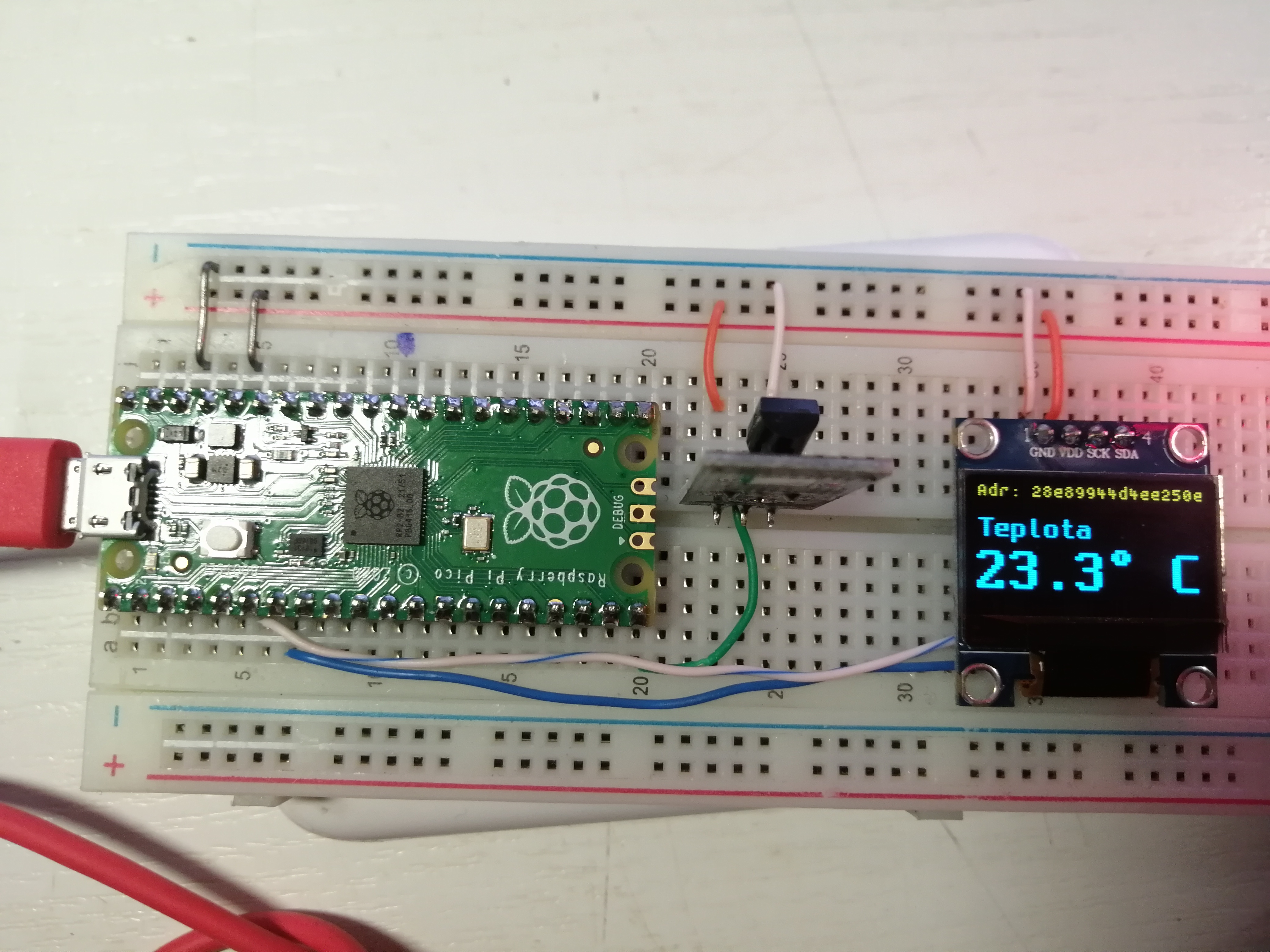
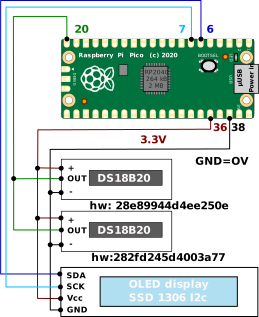
Dvě čidla na jedné sběrnici 1-Wire
Na OLED displeji jsem si zjistil hardwarové adresy jednotlivých čidel:
-
28e89944d4ee250e
-
282fd245d4003a77
#include <stdio.h>
#include "pico/stdlib.h"
#include "hardware/gpio.h"
#include "ssd1306.h"
#include "font_spleen_8x5.h"
#include "font_spleen_16x8a.h"

// konstanty pro displej
#define DISPLAY_WIDTH 128
#define DISPLAY_HEIGHT 64
#define I2C_ADDRESS 0x3C
#define I2C_FREQ 400000
#define SLEEPTIME 55


#include "modules/pico-onewire/api/one_wire.h"

void setup_gpios(void) {
    i2c_init(i2c_default, I2C_FREQ);
    gpio_set_function(PICO_DEFAULT_I2C_SDA_PIN, GPIO_FUNC_I2C);
    gpio_set_function(PICO_DEFAULT_I2C_SCL_PIN, GPIO_FUNC_I2C);
    gpio_pull_up(PICO_DEFAULT_I2C_SDA_PIN);
    gpio_pull_up(PICO_DEFAULT_I2C_SCL_PIN);
}

rom_address_t address0{0x28, 0xe8, 0x99, 0x44, 0xd4, 0xee, 0x25, 0x0e };
rom_address_t address1{0x28, 0x2f, 0xd2, 0x45, 0xd4, 0x00, 0x3a, 0x77 };


int main()
{
char buf[128];
ssd1306_t disp;
int i=0;

    stdio_init_all();
    // pauza na nahozeni seriove linky
    //    sleep_ms(20000);

    setup_gpios();
    disp.external_vcc = false;
    ssd1306_init(&disp, DISPLAY_WIDTH, DISPLAY_HEIGHT, I2C_ADDRESS, i2c_default);
    ssd1306_clear(&disp);

    One_wire one_wire0(15); //GP15 - Pin 20 on Pi Pico
    one_wire0.init();
    while (true) {
	// one_wire.single_device_read_rom(address0);
        printf("Device Address 0: %02x%02x%02x%02x%02x%02x%02x%02x\n", address0.rom[0], address0.rom[1], address0.rom[2], address0.rom[3], address0.rom[4], address0.rom[5], address0.rom[6], address0.rom[7]);
        printf("Device Address 1: %02x%02x%02x%02x%02x%02x%02x%02x\n", address1.rom[0], address1.rom[1], address1.rom[2], address1.rom[3], address1.rom[4], address1.rom[5], address1.rom[6], address1.rom[7]);
	ssd1306_clear(&disp);
        switch(i) {

	    case 0:
		one_wire0.convert_temperature(address0, true, false);
		printf("Temperature: %3.1foC\n", one_wire0.temperature(address0));
		ssd1306_draw_string_with_font(&disp, 1,  1, 1, font_spleen_8x5, "Venkovní" );
		snprintf(buf,20,"%3.1f \xb0%s", one_wire0.temperature(address0),"C");
		break;
	    case 1:
	    default:
		one_wire0.convert_temperature(address1, true, false);
		printf("Temperature: %3.1foC\n", one_wire0.temperature(address1));
		ssd1306_draw_string_with_font(&disp, 1,  1, 1, font_spleen_8x5, "Vnitøní" );
		snprintf(buf,20,"%3.1f \xb0%s", one_wire0.temperature(address1),"C");
		break;
	}
	ssd1306_draw_string_with_font(&disp, 1,  16,  1, font_spleen_16x8a, "Teplota" );
	ssd1306_draw_string_with_font(&disp, 0,  32,  2, font_spleen_16x8a, buf);
	ssd1306_show(&disp);
        sleep_ms(1000);
	if(i==0) i=1; else i=0;
    }
    return 0;
}$ ffmpeg -i VID_20240218_183024.mp4 -vf "transpose=1" -acodec copy temp.mp4 (1)
$ ffmpeg -i temp.mp4 -vf "transpose=1" -acodec copy teplota_2cidla.mp4 (2)| 1 | Otočení o 90°. |
| 2 | Ještě jedno otočení o 90°. |
Zabalený celý projekt teplota4_2cidla_oled.tar.gz