Rozchození displeje 8 znaků x 7 segmentů s čipem MAX7219 je překvapivě jednoduché v Pythonu.
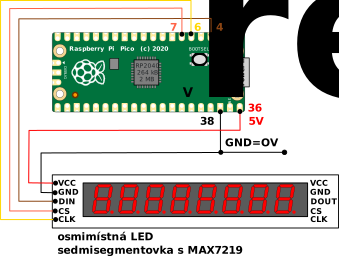
Schema zapojení
Pico 8x7segmentovka MAX7219
-
CLK pin je na GPIO04 (pin 4)
-
DIN pin je na GPIO02 (pin 6)
-
CS pin je na GPIO05 (pin 7)
Používá se SPI 0.
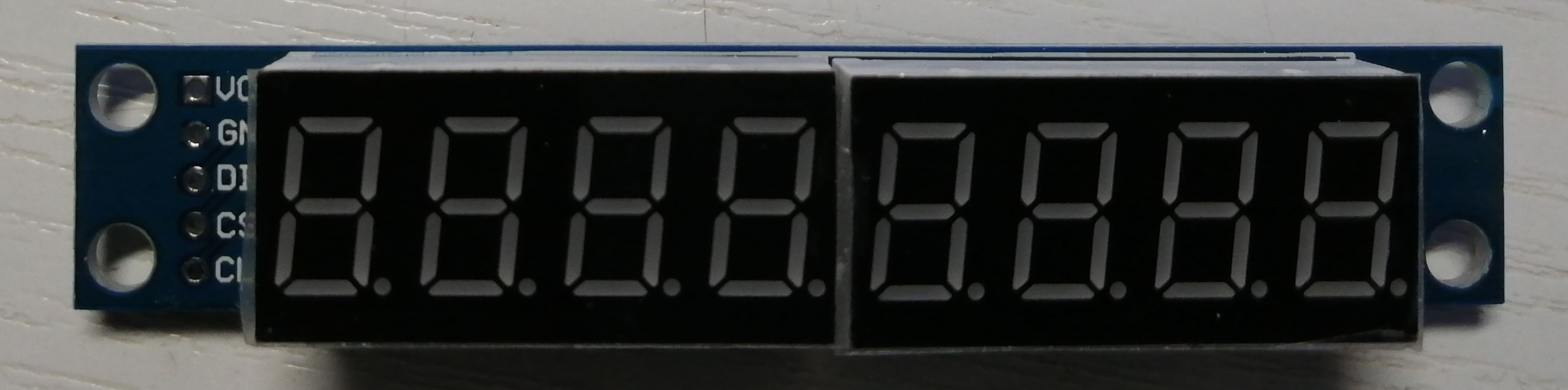
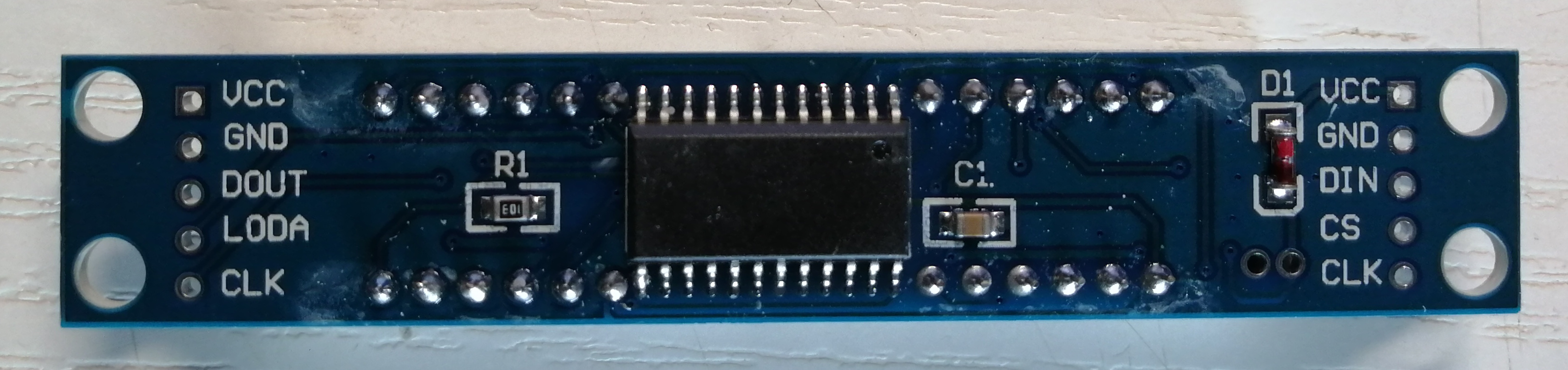
LED displej - 7 segmentový, 8 znaků MAX7219 - červený (43 Kč) — čip je čínský klon bez označení, nikoliv originální MAX7219
Displej je nutné napájet z 5V.
Zdrojové kódy v Pythonu
max7219_8digit.py
# Licence: GPLv3
# Copyright 2017 Paul Dwerryhouse <paul@dwerryhouse.com.au>

CHAR_MAP = {
    '0': 0x7e, '1': 0x30, '2': 0x6d, '3': 0x79,
    '4': 0x33, '5': 0x5b, '6': 0x5f, '7': 0x70,
    '8': 0x7f, '9': 0x7b, 'a': 0x77, 'b': 0x1f,
    'c': 0x4e, 'd': 0x3d, 'e': 0x4f, 'f': 0x47,
    'g': 0x7b, 'h': 0x37, 'i': 0x30, 'j': 0x3c,
    'k': 0x57, 'l': 0x0e, 'm': 0x54, 'n': 0x15,
    'o': 0x1d, 'p': 0x67, 'q': 0x73, 'r': 0x05,
    's': 0x5b, 't': 0x0f, 'u': 0x1c, 'v': 0x3e,
    'w': 0x2a, 'x': 0x37, 'y': 0x3b, 'z': 0x6d,
    'A': 0x77, 'B': 0x1f, 'C': 0x4e, 'D': 0x3d,
    'E': 0x4f, 'F': 0x47, 'G': 0x7b, 'H': 0x37,
    'I': 0x30, 'J': 0x3c, 'K': 0x57, 'L': 0x0e,
    'M': 0x54, 'N': 0x15, 'O': 0x1d, 'P': 0x67,
    'Q': 0x73, 'R': 0x05, 'S': 0x5b, 'T': 0x0f,
    'U': 0x1c, 'V': 0x3e, 'W': 0x2a, 'X': 0x37,
    'Y': 0x3b, 'Z': 0x6d, ' ': 0x00, '-': 0x01,
    '\xb0': 0x63, '.': 0x80
}

REG_NO_OP           = 0x00
REG_DIGIT_BASE      = 0x01
REG_DECODE_MODE     = 0x09
REG_INTENSITY       = 0x0a
REG_SCAN_LIMIT      = 0x0b
REG_SHUTDOWN        = 0x0c
REG_DISPLAY_TEST    = 0x0f

class Display:

    def __init__(self, spi, ss, intensity=7):
        self.spi = spi
        self.ss = ss
        self.buffer = bytearray(8)
        self.intensity = intensity
        self.reset()

    def reset(self):
        self.set_register(REG_DECODE_MODE, 0)
        self.set_register(REG_INTENSITY, self.intensity)
        self.set_register(REG_SCAN_LIMIT, 7)
        self.set_register(REG_DISPLAY_TEST, 0)
        self.set_register(REG_SHUTDOWN, 1)

    def set_register(self, register, value):
        self.ss.off()
        self.spi.write(bytearray([register, value]))
        self.ss.on()

    def decode_char(self, c):
        d = CHAR_MAP.get(c)
        return d if d != None else ' '

    def write_to_buffer(self, s):
        l = len(s)
        if l < 8:
            s = "%-8s" % s
        for i in range(0,8):
            self.buffer[7-i] = self.decode_char(s[i])

    def write_to_buffer_with_dots(self, s):

      len_s = len(s)

      x = 0
      i = 0
      while i < len_s:

        if x >= 8:
          break

        elif i < (len_s - 1) and s[i+1] == '.':
          self.buffer[7-x] = self.decode_char(s[i]) | 0x80
          i += 1
        else:
          self.buffer[7-x] = self.decode_char(s[i])

        x += 1
        i += 1

      while x < 8:
        self.buffer[7-x] = self.decode_char(' ')
        x += 1

    def display(self):
        for i in range(0,8):
            self.set_register(REG_DIGIT_BASE + i, self.buffer[i])

    def set_intensity(self, i):
        self.intensity = i
        self.set_register(REG_INTENSITY, self.intensity)
test.py
# Connections:
# SCK (CLK) -> GPIO4 (pin 6)
# MOSI (DIN) -> GPIO2 (pin 4)
# SS (CS) -> GPIO5 (pin 7)

from machine import Pin, SPI
import max7219_8digit
import time

# the max7219 doesn't use the MISO, but unfortunately SoftSPI requires that
# we specify it anyway
spi = machine.SoftSPI(baudrate=100000, polarity=1, phase=0, sck=Pin(4), mosi=Pin(2), miso=Pin(0))

ss = machine.Pin(5, Pin.OUT)

display = max7219_8digit.Display(spi, ss, 4)
display.reset()
display.write_to_buffer_with_dots('Ahoj 4.IA.')
display.display()
time.sleep(2)
display.reset()
display.set_intensity(0)
display.write_to_buffer('        ')
display.display()
time.sleep(1)
display.reset()
display.set_intensity(1)
i = 1
display.write_to_buffer_with_dots(str(i))
display.display()
time.sleep(1)
display.reset()
display.set_intensity(1)
#display.write_to_buffer('        ')
#display.display()
while True:
    i += 1
    display.write_to_buffer('        ')
    display.display()
    display.write_to_buffer_with_dots(str(i))
    display.display()
time.sleep(0.1)Max7219_UpCount_V01.py
'''
 Demonstrates the use of MAX7219, digits of 7 Segment display.

 * Demonstrate "4 Digit Up Count" at the interval of 100mS.
 * Starting with 9950
 * Resets after it reaches 10000

 The Raspberry Pi Pico circuit connection for MAX7219:

 * MAX7219 VCC pin to VBUS
 * MAX7219 GND pin to GND
 * MAX7219 DIN pin to digital GPIO3
 * MAX7219 CS pin to digital GPIO5
 * MAX7219 CLOCK pin to digital GPIO2

 Name:- M.Pugazhendi
 Date:-  08thJul2021
 Version:- V0.1
 e-mail:- muthuswamy.pugazhendi@gmail.com
'''

# Import MicroPython libraries of PIN and SPI
from machine import Pin, SPI

# Import MicoPython MAX7219, 8 digit, 7segment library
import max7219_8digit

# Import timer library
import time

#Intialize the SPI
spi = machine.SoftSPI(baudrate=1000000, polarity=1, phase=0, sck=Pin(4), mosi=Pin(2), miso=Pin(0))
ss = Pin(5, Pin.OUT)

#Initialize count variable with 9950 as initial value
count=9950

# Create display instant
display = max7219_8digit.Display(spi, ss)

# Unconditionally execute the loop
while True:

 # Prefix "UP -" and add "count variable" as string
 temp = "UP -" + str(count)

 # Write the string into display buffer
 display.write_to_buffer(temp)

 # Write the buffer into MAX7219
 display.display()

 # Increment the count
 count = count + 1

 # Validate the count value. If exceeds 10000, reset it it zero.
 if count == 10000:
     count = 0

 # Sleep for about 100 ms.
time.sleep(0.1)Zdroje a odkazy
LED displej - 7 segmentový, 8 znaků MAX7219 - červený (43 Kč) — čip je čínský klon bez označení, nikoliv originální MAX7219