Použití
Čidlo se musí napájet z 5V, při napájení 3.3V nefunguje.
Konstrukce
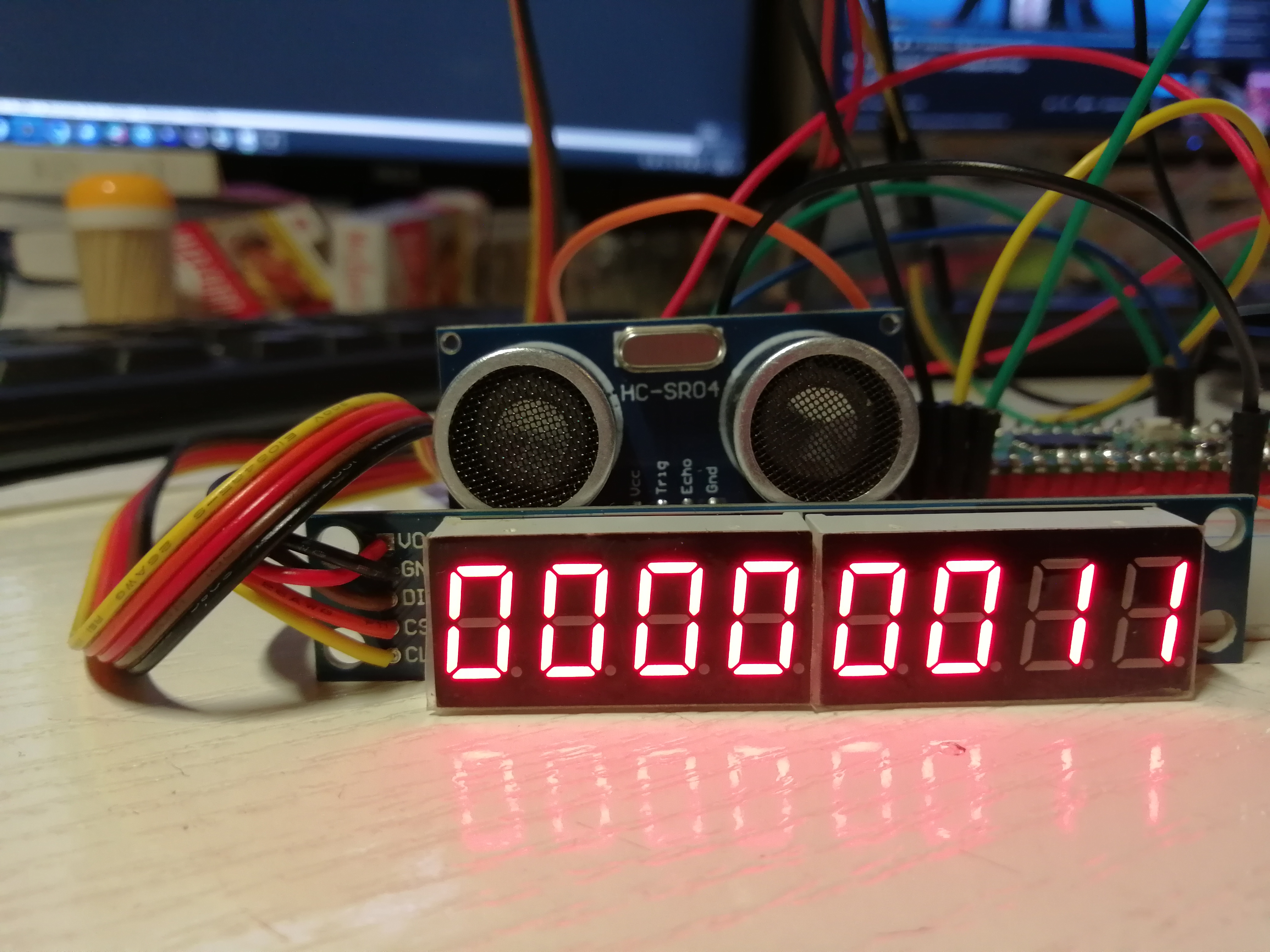
Knihovna Pico C++ HC-SR04 Library je psaná v C++, musíme proto dát příponu našemu programu buď .cxx nebo .cpp aby se spustil překladač C++.
Pokud budeme překládat překladačem C, tak program neslinkujeme s knihovnou.
Kvůli implementaci PIO je potřeba, aby echo pin byl o jednu větší než trigger pin.
Jestliže zapojíte trigger pin na GPIO5, potom echo pin musí být na GPIO6. (V našem případě používáme GPIO0 a GPIO1.)
Měření vzdálenost je s přesností na centimetry.
Konstruktor
DistanceSensor(PIO pio, uint sm, uint trigger_gpio); (1)| 1 | Parametr pio je PIO koprocesor, buď pio0 nebo pio1; parametr sm je state machine; parametr trigger_gpio je GPIO pin kam se připojí spouštecí pin (pin pro odpověď je o 1 větší). |
main.cxx
// Include the library
#include <stdio.h>
#include "pico/stdlib.h"
#include "distance_sensor.h"
#include "pico/binary_info.h"
#include "hardware/spi.h"

/* Example code to talk to a Max7219 driving an 8 digit 7 segment display via SPI

   NOTE: The device is driven at 5v, but SPI communications are at 3v3

   Connections on Raspberry Pi Pico board and a generic Max7219 board, other
   boards may vary.

   * GPIO 17 (pin 22) Chip select -> CS on Max7219 board
   * GPIO 18 (pin 24) SCK/spi0_sclk -> CLK on Max7219 board
   * GPIO 19 (pin 25) MOSI/spi0_tx -> DIN on Max7219 board
   * 5v (pin 40) -> VCC on Max7219 board
   * GND (pin 38)  -> GND on Max7219 board

   Note: SPI devices can have a number of different naming schemes for pins. See
   the Wikipedia page at https://en.wikipedia.org/wiki/Serial_Peripheral_Interface
   for variations.

*/

// This defines how many Max7219 modules we have cascaded together, in this case, just the one.
#define NUM_MODULES 1

const uint8_t CMD_NOOP = 0;
const uint8_t CMD_DIGIT0 = 1; // Goes up to 8, for each line
const uint8_t CMD_DECODEMODE = 9;
const uint8_t CMD_BRIGHTNESS = 10;
const uint8_t CMD_SCANLIMIT = 11;
const uint8_t CMD_SHUTDOWN = 12;
const uint8_t CMD_DISPLAYTEST = 15;

#ifdef PICO_DEFAULT_SPI_CSN_PIN
static inline void cs_select() {
    asm volatile("nop \n nop \n nop");
    gpio_put(PICO_DEFAULT_SPI_CSN_PIN, 0);  // Active low
    asm volatile("nop \n nop \n nop");
}

static inline void cs_deselect() {
    asm volatile("nop \n nop \n nop");
    gpio_put(PICO_DEFAULT_SPI_CSN_PIN, 1);
    asm volatile("nop \n nop \n nop");
}
#endif

#if defined(spi_default) && defined(PICO_DEFAULT_SPI_CSN_PIN)
static void write_register(uint8_t reg, uint8_t data) {
    uint8_t buf[2];
    buf[0] = reg;
    buf[1] = data;
    cs_select();
    spi_write_blocking(spi_default, buf, 2);
    cs_deselect();
    sleep_ms(1);
}

static void write_register_all(uint8_t reg, uint8_t data) {
    uint8_t buf[2];
    buf[0] = reg;
    buf[1] = data;
    cs_select();
    for (int i = 0; i< NUM_MODULES;i++) {
        spi_write_blocking(spi_default, buf, 2);
    }
    cs_deselect();
}
#endif


void display_num(int32_t num)
{
    int digit = 0;
    while (num && digit < 8) {
        write_register_all(CMD_DIGIT0 + digit, num % 10);
        num /= 10;
        digit++;
    }
}

void clear()
{
    for (int i=0;i<8;i++) {
        write_register_all(CMD_DIGIT0 + i, 0);
    }
}


// --------------------------------------------------------------------------

int main() {

    stdio_init_all();
    // inicializace sensoru
    // Create an instance of the sensor
    // specify the pio, state machine, and gpio pin connected to trigger
    // echo pin must be on gpio pin trigger + 1.
    DistanceSensor hcsr04{pio0, 0, 0};
    // inicializace dipleje
#if !defined(spi_default) || !defined(PICO_DEFAULT_SPI_SCK_PIN) || !defined(PICO_DEFAULT_SPI_TX_PIN) || !defined(PICO_DEFAULT_SPI_CSN_PIN)
#warning spi/max7219_8x7seg_spi example requires a board with SPI pins
    puts("Default SPI pins were not defined");
#else

    printf("Hello, max7219! Drawing things on a 8 x 7 segment display since 2022...\n");

    // This example will use SPI0 at 10MHz.
    spi_init(spi_default, 10 * 1000 * 1000);
    gpio_set_function(PICO_DEFAULT_SPI_SCK_PIN, GPIO_FUNC_SPI);
    gpio_set_function(PICO_DEFAULT_SPI_TX_PIN, GPIO_FUNC_SPI);

    // Make the SPI pins available to picotool
    bi_decl(bi_2pins_with_func(PICO_DEFAULT_SPI_TX_PIN, PICO_DEFAULT_SPI_SCK_PIN, GPIO_FUNC_SPI));

    // Chip select is active-low, so we'll initialise it to a driven-high state
    gpio_init(PICO_DEFAULT_SPI_CSN_PIN);
    gpio_set_dir(PICO_DEFAULT_SPI_CSN_PIN, GPIO_OUT);
    gpio_put(PICO_DEFAULT_SPI_CSN_PIN, 1);

    // Make the CS pin available to picotool
    bi_decl(bi_1pin_with_name(PICO_DEFAULT_SPI_CSN_PIN, "SPI CS"));

    // Send init sequence to device

    write_register_all(CMD_SHUTDOWN, 0);
    write_register_all(CMD_DISPLAYTEST, 0);
    write_register_all(CMD_SCANLIMIT, 7);
    write_register_all(CMD_DECODEMODE, 255);
    write_register_all(CMD_SHUTDOWN, 1);
    write_register_all(CMD_BRIGHTNESS, 8);

    clear();

    int j = 0;
    while(1) {
        // Trigger background sense
        hcsr04.TriggerRead();

        // wait for sensor to get a result
        while (hcsr04.is_sensing) {
            sleep_us(10);
        }

        // Read result
        printf("Reading %d centimeters\n", hcsr04.distance);
        clear();
        display_num(hcsr04.distance);
        sleep_ms(300);
    }
#endif
}
CMakeLists.txt
cmake_minimum_required(VERSION 3.13)
include(pico_sdk_import.cmake)

project(vzdalenost2 C CXX ASM)
set(CMAKE_C_STANDARD 11)
set(CMAKE_CXX_STANDARD 17)
pico_sdk_init()

include_directories(
    pico-distance-sensor/include
)

add_executable(vzdalenost2
	main.cxx
)

add_subdirectory(pico-distance-sensor)

target_link_libraries(vzdalenost2
                      pico_stdlib
                      hardware_pio
                      hardware_spi
                      distance-sensor
)

pico_enable_stdio_usb(vzdalenost2 1)
pico_enable_stdio_uart(vzdalenost2 0)

pico_add_extra_outputs(vzdalenost2)
Vložení knihovny do projektu
git clone https://github.com/dangarbri/pico-distance-sensorSestavení projektu
cd mereni_vzdalenosti_HC-SR04_displej
mkdir build
cd build
cmake ..
make -j12
Výstup
minicom -b 115200 -D /dev/ttyACM0Reading 78 centimeters
Reading 34 centimeters
Reading 27 centimeters
Reading 48 centimeters
Reading 58 centimeters
Reading 49 centimeters
Reading 58 centimeters
Reading 58 centimeters
Reading 58 centimeters
Reading 49 centimeters
Reading 58 centimeters
Reading 48 centimeters
Reading 47 centimeters
Reading 46 centimeters
Reading 45 centimeters
Reading 46 centimeters
Reading 53 centimeters
Reading 51 centimeters
Reading 50 centimeters
Reading 49 centimeters
Reading 48 centimeters
Reading 38 centimeters
Reading 47 centimeters
Reading 47 centimeters