V tomoto článku se pokusím zdokumentovat konstrukci elektronického kompasu. Podíváme se na osobitosti programování LCD displeje na platformě Waveshare RP2040-LCD-0.96 a tříosého digitálního kompasu Honeywell HMC5883L.
| Toto je pracovní verze, která obsahuje chyby. Není kalibrované čidlo, není započtena magnetická deklinace. |
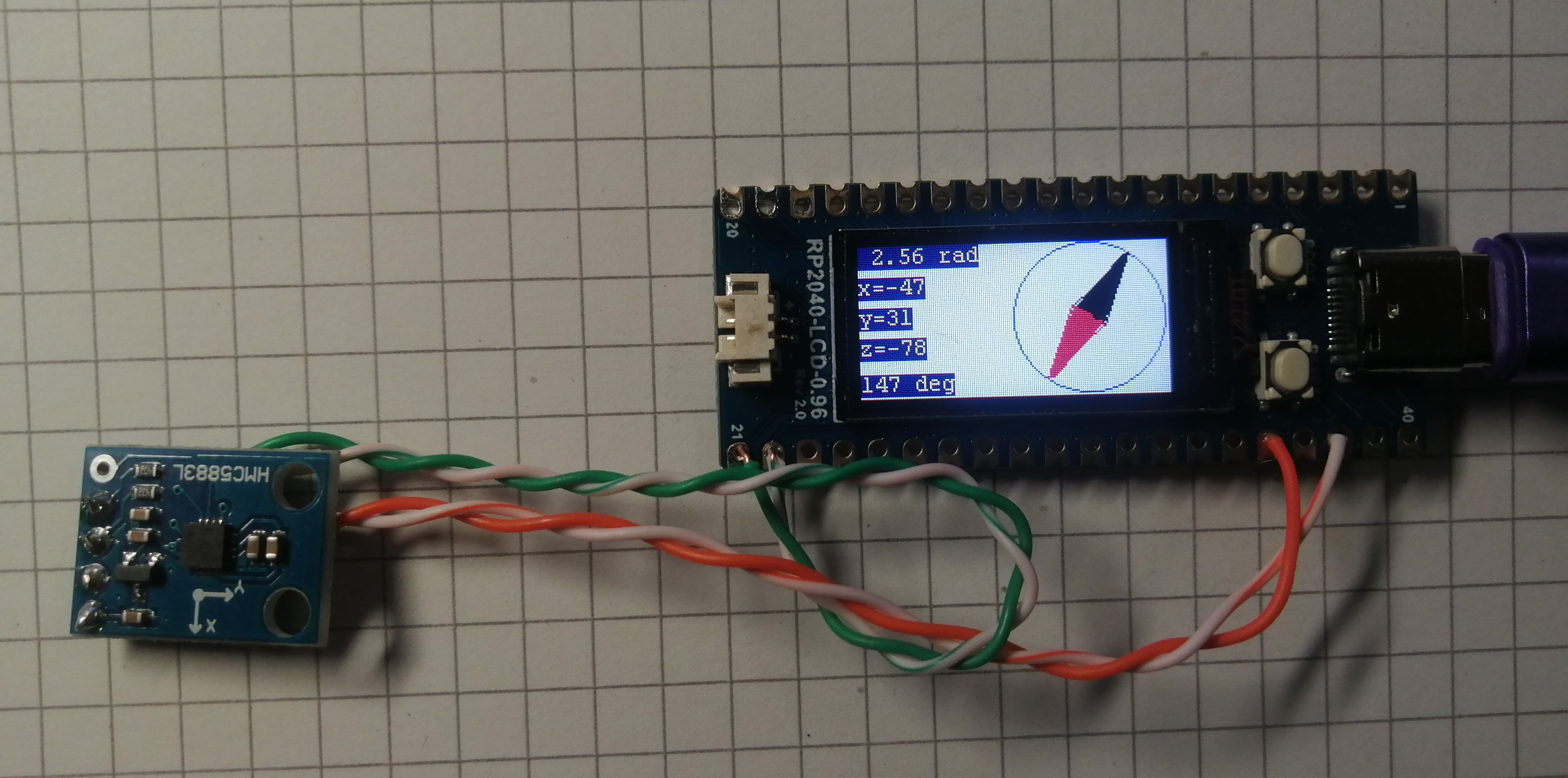
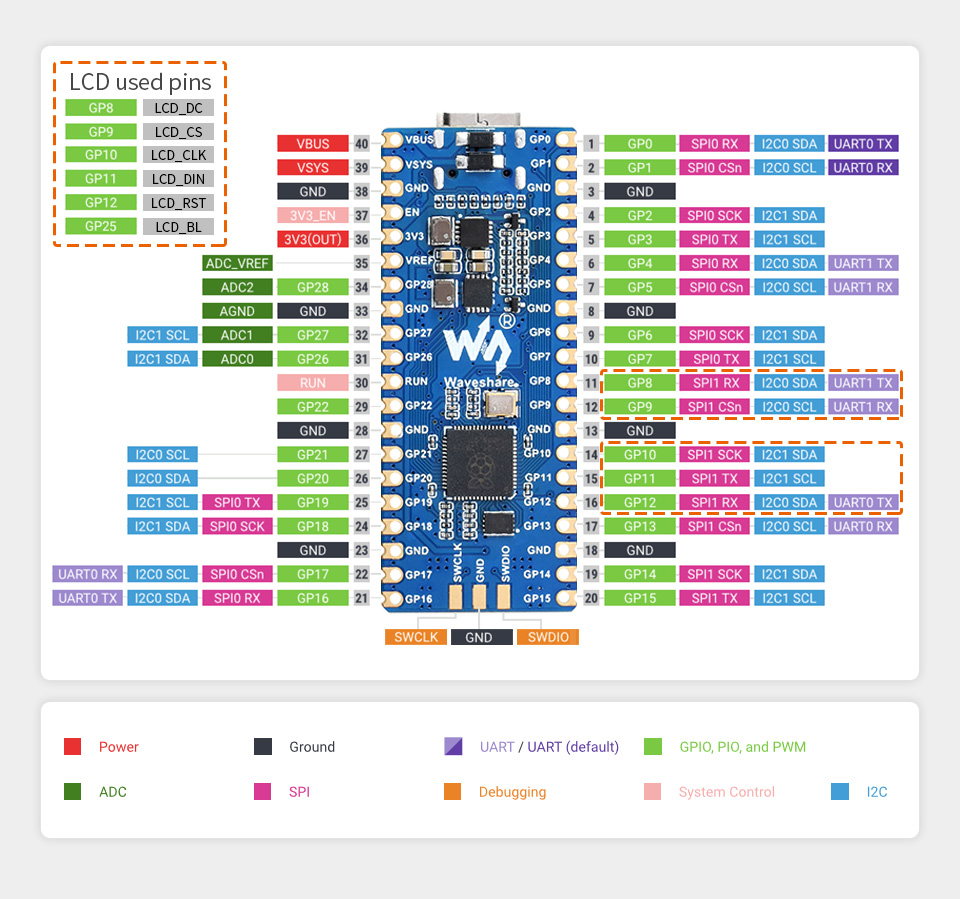
Zapojení pinů na Waveshare RP2040-LCD-0.96 je stejné jako na Raspberry Pi Pico (pokud se na ně díváme ze strany displeje) s tím rozdílem, že nemůžeme použít piny GP8, GP9, GP10, GP11, GP12 a GP25, na které je připojen LCD displej (SPI sběrnice).
Programování kompasu
Potřeboval jsem na displeji vytvořit střelku, která se bude otáčet. Střelku tvoří dva trojúhelníky. Vytvořil jsem si funkci na kresbu trojúhelníku.
/******************************************************************************
function: Draw a triangle
parameter:
    x0 : 1st point x coordinate
    y0 : 1st point y coordinate
    x1 : 2nd point x coordinate
    y1 : 2nd point y coordinate
    x2 : 3rd point x coordinate
    y2 : 3rd point y coordinate
    Color  :The color of the line segment
    Line_width : Line width
    Line_Style: Solid and dotted lines
******************************************************************************/
void Paint_Triangle(UWORD x0, UWORD y0, UWORD x1, UWORD y1, UWORD x2, UWORD y2, UWORD Color, DOT_PIXEL Line_width, bool filled)
{
    if (x0 > Paint.Width || y0 > Paint.Height || x1 > Paint.Width || y1 > Paint.Height || x2 > Paint.Width || y2 > Paint.Height )
    {
        Debug("Paint_Triangle Input exceeds the normal display range\r\n");
        return;
    }

    Paint_DrawLine(x0, y0, x1, y1, Color, Line_width, LINE_STYLE_SOLID);
    Paint_DrawLine(x1, y1, x2, y2, Color, Line_width, LINE_STYLE_SOLID);
    Paint_DrawLine(x0, y0, x2, y2, Color, Line_width, LINE_STYLE_SOLID);
    if( filled == true ) {
/*
        TODO
 */   }
}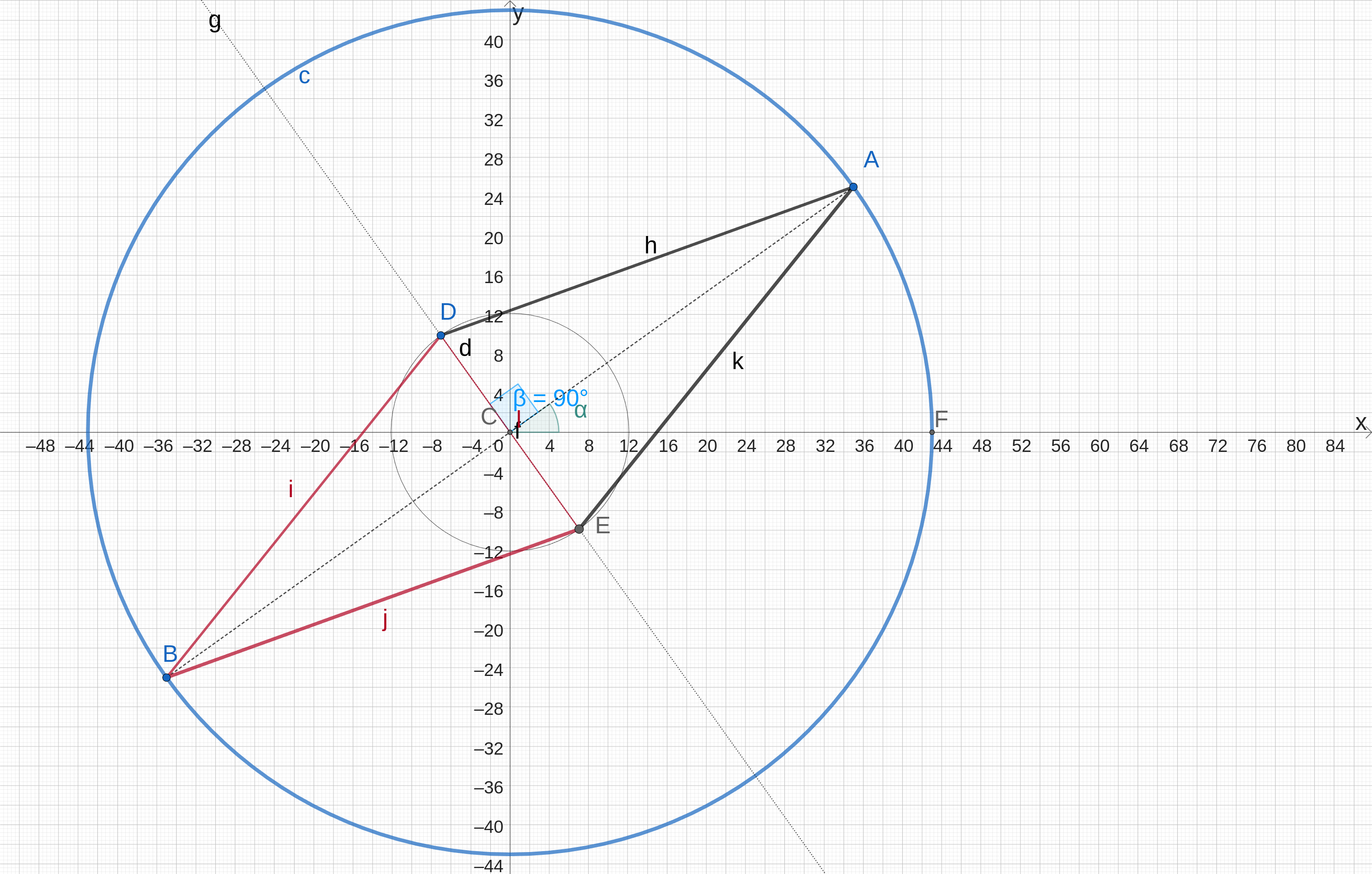
Pro snadné otáčení jsou hezké polární souřadnice, na displej ale umíme kreslit jenom v kartézských souřadnicích. Ve funkci kompas musíme udělat přepočet.
Potřebujeme 4 body: A, D, B a E.
V našem kódu budou jejich souřadnice x1 a y1 pro bod A, x2 a y2 pro bod D, x3 a y3 pro bod B a x4 a y4 pro bod E.
Bod S je střed kompasu, jeho kartézské souřadnice sx a sy budeme zadávat do kreslící funkce. Úhel natočení střelky bude alfa.
Modrá kružnice má poloměr R, hodnota v konkrétní implementaci je 39 bodů na displeji. Malá šedá kružnice má poloměr r a hodnota v konkrétní implementaci je 10 bodů na displeji.
Přepočet souřadnic z polárních na kartézské, funkce sin a cos v Céčku předpokládají úhel v radiánech:
/* kompas
 * sx je x souřadnice středu kompasu
 * sy je y souřadnice středu kompasu
 * alfa je úhel natočení střelky
 */

 #define PI 3.1415926

int kompas(int sx, int sy, float alfa)
{
int R = 39; // poloměr kompasu
int r = 10; // malý poloměr
int x1 = sx + R * sin( alfa );				// x souřadnice bodu 1
int y1 = sy + R * cos( alfa );				// y souřadnice bodu 1
int x2 = sx + r * sin( alfa + PI * 0.5 );	// x souřadnice bodu 2
int y2 = sy + r * cos( alfa + PI * 0.5 );	// y souřadnice bodu 2
int x3 = sx + R * sin( alfa + PI );			// x souřadnice bodu 3
int y3 = sy + R * cos( alfa + PI );			// y souřadnice bodu 3
int x4 = sx + r * sin( alfa - PI * 0.5 );	// x souřadnice bodu 4
int y4 = sy + r * cos( alfa - PI * 0.5 );	// y souřadnice bodu 4

	Paint_DrawCircle(sx,sy,R,BLUE,1,0);		// kružnice kolem střelky
	// obrys střelky
	Paint_Triangle(x1, y1, x2, y2, x4, y4, BLACK, DOT_PIXEL_1X1, false);
	Paint_Triangle(x3, y3, x4, y4, x2, y2, RED,   DOT_PIXEL_1X1, false);
	// výplň střelky
	for( ; r>0; r--, R--) {
	    x1 = sx + R * sin( alfa );
		y1 = sy + R * cos( alfa );
		x2 = sx + r * sin( alfa + PI * 0.5 );
		y2 = sy + r * cos( alfa + PI * 0.5 );
		x3 = sx + R * sin( alfa + PI );
		y3 = sy + R * cos( alfa + PI );
		x4 = sx + r * sin( alfa - PI * 0.5 );
		y4 = sy + r * cos( alfa - PI * 0.5 );
		if( r > 7 ) {
			Paint_Triangle(x1, y1, x2, y2, x4, y4, BLACK, DOT_PIXEL_1X1, false);
			Paint_Triangle(x3, y3, x4, y4, x2, y2, RED,   DOT_PIXEL_1X1, false);
			}
		else {
			Paint_Triangle(x1, y1, x2, y2, x4, y4, BLACK, DOT_PIXEL_2X2, false);
			Paint_Triangle(x3, y3, x4, y4, x2, y2, RED,   DOT_PIXEL_2X2, false);
			}
		}
	return 0;
}
Výplň střelky je dělána tak, že postupně zmenšujeme hodnoty poloměrů R a r o jedničku dokud je r > 0 a nakreslíme menší trojúhelník. Na malém displeji to vypadá hezky. U větších displejů bychom to museli možná dělat trochu jinak, protože by to bylo pomalé.
Výpočet úhlu natočení střelky z naměřených hodnot magnetického pole
Předpokladem správného výpočtu je, že čidlo je umístěno ve vodorovné rovině.
Výpočet úhlu střelky kompasu (zatím bez magentické deklinace). y je 16 bitová hodnota naměřená čidlem v ose y, x je 16 bitová hodnota naměřená čidlem v ose x.
Úhel je v radiánech.
uhel = atan2(y,x);Zdrojové kódy
src/CMakeLists.txt
cmake_minimum_required(VERSION 3.12)
include($ENV{PICO_SDK_PATH}/external/pico_sdk_import.cmake)
project(kompas)
pico_sdk_init()

# pridani knihoven
add_subdirectory(lib/Config)
add_subdirectory(lib/LCD)
add_subdirectory(lib/Fonts)
add_subdirectory(lib/GUI)


# pridani prohledavanych adresaru
include_directories(./lib/Config)
include_directories(./lib/GUI)
include_directories(./lib/Fonts)
include_directories(./lib/LCD)


# pridani zdrojovych kodu
add_executable(kompas
main.c
kompas.c
)

# enable usb output, disable uart output
pico_enable_stdio_usb(kompas 1)
pico_enable_stdio_uart(kompas 0)

# create map/bin/hex/uf2 file etc.
pico_add_extra_outputs(kompas)

target_link_libraries(kompas LCD GUI Fonts Config pico_stdlib hardware_spi hardware_i2c)
src/main.c
/* kompas.c
 * (c) Jirka Chráska 2025, jirka@lixis.cz
 * jednoduchy kompas s čidlem HMC5883L na I2C
 * platforma Waweshare RP2040-LCD-0.96 https://www.waveshare.com/wiki/RP2040-LCD-0.96
 */
#include "kompas.h"   // kompas

int main(void)
{
    // LCD displej 0.96 s kompasem
	LCD_kompas();

    return 0;
}
src/kompas.c
/* kompas.c
 * (c) Jirka Chráska 2025, jirka@lixis.cz
 * jednoduchy kompas s čidlem HMC5883L na I2C
 * platforma Waweshare RP2040-LCD-0.96 https://www.waveshare.com/wiki/RP2040-LCD-0.96
 */
#include <math.h>
#include <string.h>
#include "fonts.h"
#include "LCD_0in96.h"
#include "GUI_Paint.h"
#include "hardware/i2c.h"

// kompas HMC5883L na I2C
#define I2C_PORT i2c0
#define I2C_SDA 16
#define I2C_SCL 17
#define DEVICE_ADDR   0x1e


int16_t x_offset =  0;
int16_t y_offset =  0;
int16_t z_offset =  0;

float PI = 3.1415926;

/* kompas
 * sx je x souřadnice středu
 * sy je y souřadnice středu
 * alfa je úhel natočení střelky
 */

int kompas(int sx, int sy, float alfa)
{
int R = 39; // poloměr kompasu
int r = 10; // malý poloměr
int x1 = sx + R * sin( alfa );				// x souřadnice bodu A
int y1 = sy + R * cos( alfa );				// y souřadnice bodu A
int x2 = sx + r * sin( alfa + PI * 0.5 );	// x souřadnice bodu D
int y2 = sy + r * cos( alfa + PI * 0.5 );	// y souřadnice bodu D
int x3 = sx + R * sin( alfa + PI );			// x souřadnice bodu B
int y3 = sy + R * cos( alfa + PI );			// y souřadnice bodu B
int x4 = sx + r * sin( alfa - PI * 0.5 );	// x souřadnice bodu E
int y4 = sy + r * cos( alfa - PI * 0.5 );	// y souřadnice bodu E

	Paint_DrawCircle(sx,sy,R,BLUE,1,0);		// kružnice kolem střelky
	// obrys střelky
	Paint_Triangle(x1, y1, x2, y2, x4, y4, BLACK, DOT_PIXEL_1X1, false);
	Paint_Triangle(x3, y3, x4, y4, x2, y2, RED,   DOT_PIXEL_1X1, false);
	// výplň střelky
	for( ; r>0; r--, R--) {
	    x1 = sx + R * sin( alfa );
		y1 = sy + R * cos( alfa );
		x2 = sx + r * sin( alfa + PI * 0.5 );
		y2 = sy + r * cos( alfa + PI * 0.5 );
		x3 = sx + R * sin( alfa + PI );
		y3 = sy + R * cos( alfa + PI );
		x4 = sx + r * sin( alfa - PI * 0.5 );
		y4 = sy + r * cos( alfa - PI * 0.5 );
		if( r > 7 ) {
			Paint_Triangle(x1, y1, x2, y2, x4, y4, BLACK, DOT_PIXEL_1X1, false);
			Paint_Triangle(x3, y3, x4, y4, x2, y2, RED,   DOT_PIXEL_1X1, false);
			}
		else {
			Paint_Triangle(x1, y1, x2, y2, x4, y4, BLACK, DOT_PIXEL_2X2, false);
			Paint_Triangle(x3, y3, x4, y4, x2, y2, RED,   DOT_PIXEL_2X2, false);
			}
		}
	return 0;
}

int LCD_kompas(void)
{
	// buffery pro HMC5883L
	uint8_t cmd_buf[4];
    uint8_t read_data[7];
	int16_t x,y,z;

	// I2C inicializace. Použijeme 400Khz.
    i2c_init(I2C_PORT, 400*1000);

    gpio_set_function(I2C_SDA, GPIO_FUNC_I2C);
    gpio_set_function(I2C_SCL, GPIO_FUNC_I2C);
    gpio_pull_up(I2C_SDA);
    gpio_pull_up(I2C_SCL);


    DEV_Delay_ms(100);
    printf("Kompas na displeji\n");
    if(DEV_Module_Init()!=0){
        return -1;
    }

    /* LCD Init */
    printf("Test 0.96inch LCD dipleje...\n");
    LCD_0IN96_Init(HORIZONTAL);
    LCD_0IN96_Clear(WHITE);
    //DEV_Delay_ms(6000);


    UDOUBLE Imagesize = LCD_0IN96_HEIGHT*LCD_0IN96_WIDTH*2;
    UWORD *BlackImage;
    if((BlackImage = (UWORD *)malloc(Imagesize)) == NULL) {
        printf("Nedostatek pameti...\n");
        exit(0);
    }
    // Vytvoříme nový obrázek v cache a vypníme ho bílou barvou
    Paint_NewImage((UBYTE *)BlackImage,LCD_0IN96.WIDTH,LCD_0IN96.HEIGHT, 0, WHITE);
    Paint_SetScale(65);
    Paint_SetRotate(ROTATE_0);
    Paint_Clear(WHITE);

    //  GUI
	printf("kreslim...\n");

	double uhel;	// úhel vektoru intenzity magnetického pole z měření v osách x a y (nevím zda je to dobře)
	char buf[128];
	memset(buf,'\0',128);
	memset(read_data,'\0',7);
	// test kompasu
	for( int i = 0; i <= 360; i++ ){
		Paint_Clear(WHITE);
		uhel = i*PI/180;
    	kompas(120,40,uhel);
		sprintf(buf,"%5.2f rad",uhel);
		Paint_DrawString_EN (0, 0 , buf, &Font12, 0xfff0, 0x000f);
		sprintf(buf,"%3d deg",i);
		Paint_DrawString_EN (0, 67, buf, &Font12, 0xfff0, 0x000f);
		sprintf(buf,"Test");
		Paint_DrawString_EN (0, 40, buf, &Font16, 0xfff0, 0x000f);
		LCD_0IN96_Display(BlackImage);
		DEV_Delay_ms(2);
	}

	printf("Kompas mereni...\n");

	// nastaveni HMC5883L
    // init 8-average, 15 Hz default, normal measurement
    cmd_buf[0] = 0x00;
    cmd_buf[1] = 0x70;
    i2c_write_blocking(I2C_PORT, DEVICE_ADDR,cmd_buf, 2,true);
    cmd_buf[0] = 0x01;
    cmd_buf[1] = 0xa0; //0xa0
    i2c_write_blocking(I2C_PORT, DEVICE_ADDR,cmd_buf, 2,true);

	while(1) {
        //Single-Measurement Mode (Default).
        cmd_buf[0] = 0x02;
        cmd_buf[1] = 0x01; //0x00
        i2c_write_blocking(I2C_PORT, DEVICE_ADDR,cmd_buf, 2,false);
        sleep_ms(6);

        cmd_buf[0] = 0x03;
		i2c_write_blocking(I2C_PORT, DEVICE_ADDR,cmd_buf, 1,false);
        i2c_read_blocking(I2C_PORT, DEVICE_ADDR, read_data, 6, false);


        x = ((uint16_t)read_data[0]) << 8 | read_data[1];
        z = ((uint16_t)read_data[2]) << 8 | read_data[3];
        y = ((uint16_t)read_data[4]) << 8 | read_data[5];


        uhel = atan2(y-y_offset,x-x_offset); // v radianech
        printf("x=%d, y=%d, z=%d, uhel=%f rad, uhelyx=%f deg\n", x,y,z,uhel,uhel*57.295 );  // pro kalibraci

        if(uhel < 0) uhel += 2*PI;

		Paint_Clear(WHITE);
    	kompas(120,40,uhel);
		sprintf(buf,"%5.2f rad",uhel);
		Paint_DrawString_EN (0, 0 , buf, &Font12, 0xfff0, 0x000f);
		sprintf(buf,"%3.0f deg",uhel*180/PI);
		Paint_DrawString_EN (0, 67, buf, &Font12, 0xfff0, 0x000f);
		sprintf(buf,"x=%d", x);
		Paint_DrawString_EN (0, 16, buf, &Font12, 0xfff0, 0x000f);
		sprintf(buf,"y=%d", y);
		Paint_DrawString_EN (0, 32, buf, &Font12, 0xfff0, 0x000f);
		sprintf(buf,"z=%d", z);
		Paint_DrawString_EN (0, 48, buf, &Font12, 0xfff0, 0x000f);

		LCD_0IN96_Display(BlackImage);
		//DEV_Delay_ms(500);
		sleep_ms(50);
		}
	/* Module Exit */
    free(BlackImage);
    BlackImage = NULL;
    DEV_Module_Exit();
    return 0;
}
src/lib/GUI/GUI_Paint.c
#include "GUI_Paint.h"
#include "DEV_Config.h"
#include "Debug.h"
#include <stdint.h>
#include <stdlib.h>
#include <string.h> //memset()
#include <math.h>
PAINT Paint;
/******************************************************************************
function: Create Image
parameter:
image : Pointer to the image cache
width : The width of the picture
Height : The height of the picture
Color : Whether the picture is inverted
******************************************************************************/
void Paint_NewImage(UBYTE *image, UWORD Width, UWORD Height, UWORD Rotate, UWORD Color)
{
Paint.Image = NULL;
Paint.Image = image;
Paint.WidthMemory = Width;
Paint.HeightMemory = Height;
Paint.Color = Color;
Paint.Scale = 2;
Paint.WidthByte = (Width % 8 == 0) ? (Width / 8) : (Width / 8 + 1);
Paint.HeightByte = Height;
// printf("WidthByte = %d, HeightByte = %d\r\n", Paint.WidthByte, Paint.HeightByte);
// printf(" LCD_WIDTH / 8 = %d\r\n", 122 / 8);
Paint.Rotate = Rotate;
Paint.Mirror = MIRROR_NONE;
if (Rotate == ROTATE_0 || Rotate == ROTATE_180)
{
Paint.Width = Width;
Paint.Height = Height;
}
else
{
Paint.Width = Height;
Paint.Height = Width;
}
}
/******************************************************************************
function: Select Image
parameter:
image : Pointer to the image cache
******************************************************************************/
void Paint_SelectImage(UBYTE *image)
{
Paint.Image = image;
}
/******************************************************************************
function: Select Image Rotate
parameter:
Rotate : 0,90,180,270
******************************************************************************/
void Paint_SetRotate(UWORD Rotate)
{
if (Rotate == ROTATE_0 || Rotate == ROTATE_90 || Rotate == ROTATE_180 || Rotate == ROTATE_270)
{
Debug("Set image Rotate %d\r\n", Rotate);
Paint.Rotate = Rotate;
}
else
{
Debug("rotate = 0, 90, 180, 270\r\n");
}
}
void Paint_SetScale(UBYTE scale)
{
if (scale == 2)
{
Paint.Scale = scale;
Paint.WidthByte = (Paint.WidthMemory % 8 == 0) ? (Paint.WidthMemory / 8) : (Paint.WidthMemory / 8 + 1);
}
else if (scale == 4)
{
Paint.Scale = scale;
Paint.WidthByte = (Paint.WidthMemory % 4 == 0) ? (Paint.WidthMemory / 4) : (Paint.WidthMemory / 4 + 1);
}
else if (scale == 16)
{
Paint.Scale = scale;
Paint.WidthByte = (Paint.WidthMemory % 2 == 0) ? (Paint.WidthMemory / 2) : (Paint.WidthMemory / 2 + 1);
}
else if (scale == 65)
{
Paint.Scale = scale;
Paint.WidthByte = Paint.WidthMemory * 2;
}
else
{
Debug("Set Scale Input parameter error\r\n");
Debug("Scale Only support: 2 4 16 65\r\n");
}
}
/******************************************************************************
function: Select Image mirror
parameter:
mirror :Not mirror,Horizontal mirror,Vertical mirror,Origin mirror
******************************************************************************/
void Paint_SetMirroring(UBYTE mirror)
{
if (mirror == MIRROR_NONE || mirror == MIRROR_HORIZONTAL ||
mirror == MIRROR_VERTICAL || mirror == MIRROR_ORIGIN)
{
Debug("mirror image x:%s, y:%s\r\n", (mirror & 0x01) ? "mirror" : "none", ((mirror >> 1) & 0x01) ? "mirror" : "none");
Paint.Mirror = mirror;
}
else
{
Debug("mirror should be MIRROR_NONE, MIRROR_HORIZONTAL, \
MIRROR_VERTICAL or MIRROR_ORIGIN\r\n");
}
}
/******************************************************************************
function: Draw Pixels
parameter:
Xpoint : At point X
Ypoint : At point Y
Color : Painted colors
******************************************************************************/
void Paint_SetPixel(UWORD Xpoint, UWORD Ypoint, UWORD Color)
{
if (Xpoint > Paint.Width || Ypoint > Paint.Height)
{
Debug("Exceeding display boundaries\r\n");
return;
}
UWORD X, Y;
switch (Paint.Rotate)
{
case 0:
X = Xpoint;
Y = Ypoint;
break;
case 90:
X = Paint.WidthMemory - Ypoint - 1;
Y = Xpoint;
break;
case 180:
X = Paint.WidthMemory - Xpoint - 1;
Y = Paint.HeightMemory - Ypoint - 1;
break;
case 270:
X = Ypoint;
Y = Paint.HeightMemory - Xpoint - 1;
break;
default:
return;
}
switch (Paint.Mirror)
{
case MIRROR_NONE:
break;
case MIRROR_HORIZONTAL:
X = Paint.WidthMemory - X - 1;
break;
case MIRROR_VERTICAL:
Y = Paint.HeightMemory - Y - 1;
break;
case MIRROR_ORIGIN:
X = Paint.WidthMemory - X - 1;
Y = Paint.HeightMemory - Y - 1;
break;
default:
return;
}
if (X > Paint.WidthMemory || Y > Paint.HeightMemory)
{
Debug("Exceeding display boundaries\r\n");
return;
}
if (Paint.Scale == 2)
{
UDOUBLE Addr = X / 8 + Y * Paint.WidthByte;
UBYTE Rdata = Paint.Image[Addr];
if (Color & 0xff == BLACK)
Paint.Image[Addr] = Rdata & ~(0x80 >> (X % 8));
else
Paint.Image[Addr] = Rdata | (0x80 >> (X % 8));
}
else if (Paint.Scale == 4)
{
UDOUBLE Addr = X / 4 + Y * Paint.WidthByte;
Color = Color % 4; // Guaranteed color scale is 4 --- 0~3
UBYTE Rdata = Paint.Image[Addr];
Rdata = Rdata & (~(0xC0 >> ((X % 4) * 2)));
Paint.Image[Addr] = Rdata | ((Color << 6) >> ((X % 4) * 2));
}
else if (Paint.Scale == 16)
{
UDOUBLE Addr = X / 2 + Y * Paint.WidthByte;
UBYTE Rdata = Paint.Image[Addr];
Color = Color % 16;
Rdata = Rdata & (~(0xf0 >> ((X % 2) * 4)));
Paint.Image[Addr] = Rdata | ((Color << 4) >> ((X % 2) * 4));
}
else if (Paint.Scale == 65)
{
UDOUBLE Addr = X * 2 + Y * Paint.WidthByte;
Paint.Image[Addr] = 0xff & (Color >> 8);
Paint.Image[Addr + 1] = 0xff & Color;
}
}
/******************************************************************************
function: Clear the color of the picture
parameter:
Color : Painted colors
******************************************************************************/
void Paint_Clear(UWORD Color)
{
if (Paint.Scale == 2 || Paint.Scale == 4)
{
for (UWORD Y = 0; Y < Paint.HeightByte; Y++)
{
for (UWORD X = 0; X < Paint.WidthByte; X++)
{ // 8 pixel = 1 byte
UDOUBLE Addr = X + Y * Paint.WidthByte;
Paint.Image[Addr] = Color;
}
}
}
else if (Paint.Scale == 16)
{
for (UWORD Y = 0; Y < Paint.HeightByte; Y++)
{
for (UWORD X = 0; X < Paint.WidthByte; X++)
{ // 8 pixel = 1 byte
UDOUBLE Addr = X + Y * Paint.WidthByte;
Color = Color & 0x0f;
Paint.Image[Addr] = (Color << 4) | Color;
}
}
}
else if (Paint.Scale == 65)
{
for (UWORD Y = 0; Y < Paint.HeightByte; Y++)
{
for (UWORD X = 0; X < Paint.WidthByte; X++)
{ // 8 pixel = 1 byte
UDOUBLE Addr = X * 2 + Y * Paint.WidthByte;
Paint.Image[Addr] = 0xff & (Color >> 8);
Paint.Image[Addr + 1] = 0xff & Color;
}
}
}
}
/******************************************************************************
function: Clear the color of a window
parameter:
Xstart : x starting point
Ystart : Y starting point
Xend : x end point
Yend : y end point
Color : Painted colors
******************************************************************************/
void Paint_ClearWindows(UWORD Xstart, UWORD Ystart, UWORD Xend, UWORD Yend, UWORD Color)
{
UWORD X, Y;
for (Y = Ystart; Y < Yend; Y++)
{
for (X = Xstart; X < Xend; X++)
{ // 8 pixel = 1 byte
Paint_SetPixel(X, Y, Color);
}
}
}
/******************************************************************************
function: Draw Point(Xpoint, Ypoint) Fill the color
parameter:
Xpoint : The Xpoint coordinate of the point
Ypoint : The Ypoint coordinate of the point
Color : Painted color
Dot_Pixel : point size
Dot_Style : point Style
******************************************************************************/
void Paint_DrawPoint(UWORD Xpoint, UWORD Ypoint, UWORD Color,
DOT_PIXEL Dot_Pixel, DOT_STYLE Dot_Style)
{
if (Xpoint > Paint.Width || Ypoint > Paint.Height)
{
Debug("Paint_DrawPoint Input exceeds the normal display range\r\n");
printf("Xpoint = %d , Paint.Width = %d \r\n ", Xpoint, Paint.Width);
printf("Ypoint = %d , Paint.Height = %d \r\n ", Ypoint, Paint.Height);
return;
}
int16_t XDir_Num, YDir_Num;
if (Dot_Style == DOT_FILL_AROUND)
{
for (XDir_Num = 0; XDir_Num < 2 * Dot_Pixel - 1; XDir_Num++)
{
for (YDir_Num = 0; YDir_Num < 2 * Dot_Pixel - 1; YDir_Num++)
{
if (Xpoint + XDir_Num - Dot_Pixel < 0 || Ypoint + YDir_Num - Dot_Pixel < 0)
break;
// printf("x = %d, y = %d\r\n", Xpoint + XDir_Num - Dot_Pixel, Ypoint + YDir_Num - Dot_Pixel);
Paint_SetPixel(Xpoint + XDir_Num - Dot_Pixel, Ypoint + YDir_Num - Dot_Pixel, Color);
}
}
}
else
{
for (XDir_Num = 0; XDir_Num < Dot_Pixel; XDir_Num++)
{
for (YDir_Num = 0; YDir_Num < Dot_Pixel; YDir_Num++)
{
Paint_SetPixel(Xpoint + XDir_Num - 1, Ypoint + YDir_Num - 1, Color);
}
}
}
}
/******************************************************************************
function: Draw a line of arbitrary slope
parameter:
Xstart :Starting Xpoint point coordinates
Ystart :Starting Xpoint point coordinates
Xend :End point Xpoint coordinate
Yend :End point Ypoint coordinate
Color :The color of the line segment
Line_width : Line width
Line_Style: Solid and dotted lines
******************************************************************************/
void Paint_DrawLine(UWORD Xstart, UWORD Ystart, UWORD Xend, UWORD Yend,
UWORD Color, DOT_PIXEL Line_width, LINE_STYLE Line_Style)
{
if (Xstart > Paint.Width || Ystart > Paint.Height ||
Xend > Paint.Width || Yend > Paint.Height)
{
Debug("Paint_DrawLine Input exceeds the normal display range\r\n");
return;
}
UWORD Xpoint = Xstart;
UWORD Ypoint = Ystart;
int dx = (int)Xend - (int)Xstart >= 0 ? Xend - Xstart : Xstart - Xend;
int dy = (int)Yend - (int)Ystart <= 0 ? Yend - Ystart : Ystart - Yend;
// Increment direction, 1 is positive, -1 is counter;
int XAddway = Xstart < Xend ? 1 : -1;
int YAddway = Ystart < Yend ? 1 : -1;
// Cumulative error
int Esp = dx + dy;
char Dotted_Len = 0;
for (;;)
{
Dotted_Len++;
// Painted dotted line, 2 point is really virtual
if (Line_Style == LINE_STYLE_DOTTED && Dotted_Len % 3 == 0)
{
// Debug("LINE_DOTTED\r\n");
if (Color)
Paint_DrawPoint(Xpoint, Ypoint, BLACK, Line_width, DOT_STYLE_DFT);
else
Paint_DrawPoint(Xpoint, Ypoint, WHITE, Line_width, DOT_STYLE_DFT);
Dotted_Len = 0;
}
else
{
Paint_DrawPoint(Xpoint, Ypoint, Color, Line_width, DOT_STYLE_DFT);
}
if (2 * Esp >= dy)
{
if (Xpoint == Xend)
break;
Esp += dy;
Xpoint += XAddway;
}
if (2 * Esp <= dx)
{
if (Ypoint == Yend)
break;
Esp += dx;
Ypoint += YAddway;
}
}
}
/******************************************************************************
function: Draw a triangle
parameter:
x0 : 1st point x coordinate
y0 : 1st point y coordinate
x1 : 2nd point x coordinate
y1 : 2nd point y coordinate
x2 : 3rd point x coordinate
y2 : 3rd point y coordinate
Color :The color of the line segment
Line_width : Line width
Line_Style: Solid and dotted lines
******************************************************************************/
void Paint_Triangle(UWORD x0, UWORD y0, UWORD x1, UWORD y1, UWORD x2, UWORD y2, UWORD Color, DOT_PIXEL Line_width, bool filled)
{
if (x0 > Paint.Width || y0 > Paint.Height || x1 > Paint.Width || y1 > Paint.Height || x2 > Paint.Width || y2 > Paint.Height )
{
Debug("Paint_Triangle Input exceeds the normal display range\r\n");
return;
}
Paint_DrawLine(x0, y0, x1, y1, Color, Line_width, LINE_STYLE_SOLID);
Paint_DrawLine(x1, y1, x2, y2, Color, Line_width, LINE_STYLE_SOLID);
Paint_DrawLine(x0, y0, x2, y2, Color, Line_width, LINE_STYLE_SOLID);
if( filled == true ) {
/* TODO
*/ }
}
/******************************************************************************
function: Draw a rectangle
parameter:
Xstart :Rectangular Starting Xpoint point coordinates
Ystart :Rectangular Starting Xpoint point coordinates
Xend :Rectangular End point Xpoint coordinate
Yend :Rectangular End point Ypoint coordinate
Color :The color of the Rectangular segment
Line_width: Line width
Draw_Fill : Whether to fill the inside of the rectangle
******************************************************************************/
void Paint_DrawRectangle(UWORD Xstart, UWORD Ystart, UWORD Xend, UWORD Yend,
UWORD Color, DOT_PIXEL Line_width, DRAW_FILL Draw_Fill)
{
if (Xstart > Paint.Width || Ystart > Paint.Height ||
Xend > Paint.Width || Yend > Paint.Height)
{
Debug("Input exceeds the normal display range\r\n");
return;
}
if (Draw_Fill)
{
UWORD Ypoint;
for (Ypoint = Ystart; Ypoint < Yend; Ypoint++)
{
Paint_DrawLine(Xstart, Ypoint, Xend, Ypoint, Color, Line_width, LINE_STYLE_SOLID);
}
}
else
{
Paint_DrawLine(Xstart, Ystart, Xend, Ystart, Color, Line_width, LINE_STYLE_SOLID);
Paint_DrawLine(Xstart, Ystart, Xstart, Yend, Color, Line_width, LINE_STYLE_SOLID);
Paint_DrawLine(Xend, Yend, Xend, Ystart, Color, Line_width, LINE_STYLE_SOLID);
Paint_DrawLine(Xend, Yend, Xstart, Yend, Color, Line_width, LINE_STYLE_SOLID);
}
}
/******************************************************************************
function: Use the 8-point method to draw a circle of the
specified size at the specified position->
parameter:
X_Center :Center X coordinate
Y_Center :Center Y coordinate
Radius :circle Radius
Color :The color of the :circle segment
Line_width: Line width
Draw_Fill : Whether to fill the inside of the Circle
******************************************************************************/
void Paint_DrawCircle(UWORD X_Center, UWORD Y_Center, UWORD Radius,
UWORD Color, DOT_PIXEL Line_width, DRAW_FILL Draw_Fill)
{
if (X_Center > Paint.Width || Y_Center >= Paint.Height)
{
Debug("Paint_DrawCircle Input exceeds the normal display range\r\n");
return;
}
// Draw a circle from(0, R) as a starting point
int16_t XCurrent, YCurrent;
XCurrent = 0;
YCurrent = Radius;
// Cumulative error,judge the next point of the logo
int16_t Esp = 3 - (Radius << 1);
int16_t sCountY;
if (Draw_Fill == DRAW_FILL_FULL)
{
while (XCurrent <= YCurrent)
{ // Realistic circles
for (sCountY = XCurrent; sCountY <= YCurrent; sCountY++)
{
Paint_DrawPoint(X_Center + XCurrent, Y_Center + sCountY, Color, DOT_PIXEL_DFT, DOT_STYLE_DFT); // 1
Paint_DrawPoint(X_Center - XCurrent, Y_Center + sCountY, Color, DOT_PIXEL_DFT, DOT_STYLE_DFT); // 2
Paint_DrawPoint(X_Center - sCountY, Y_Center + XCurrent, Color, DOT_PIXEL_DFT, DOT_STYLE_DFT); // 3
Paint_DrawPoint(X_Center - sCountY, Y_Center - XCurrent, Color, DOT_PIXEL_DFT, DOT_STYLE_DFT); // 4
Paint_DrawPoint(X_Center - XCurrent, Y_Center - sCountY, Color, DOT_PIXEL_DFT, DOT_STYLE_DFT); // 5
Paint_DrawPoint(X_Center + XCurrent, Y_Center - sCountY, Color, DOT_PIXEL_DFT, DOT_STYLE_DFT); // 6
Paint_DrawPoint(X_Center + sCountY, Y_Center - XCurrent, Color, DOT_PIXEL_DFT, DOT_STYLE_DFT); // 7
Paint_DrawPoint(X_Center + sCountY, Y_Center + XCurrent, Color, DOT_PIXEL_DFT, DOT_STYLE_DFT);
}
if (Esp < 0)
Esp += 4 * XCurrent + 6;
else
{
Esp += 10 + 4 * (XCurrent - YCurrent);
YCurrent--;
}
XCurrent++;
}
}
else
{ // Draw a hollow circle
while (XCurrent <= YCurrent)
{
Paint_DrawPoint(X_Center + XCurrent, Y_Center + YCurrent, Color, Line_width, DOT_STYLE_DFT); // 1
Paint_DrawPoint(X_Center - XCurrent, Y_Center + YCurrent, Color, Line_width, DOT_STYLE_DFT); // 2
Paint_DrawPoint(X_Center - YCurrent, Y_Center + XCurrent, Color, Line_width, DOT_STYLE_DFT); // 3
Paint_DrawPoint(X_Center - YCurrent, Y_Center - XCurrent, Color, Line_width, DOT_STYLE_DFT); // 4
Paint_DrawPoint(X_Center - XCurrent, Y_Center - YCurrent, Color, Line_width, DOT_STYLE_DFT); // 5
Paint_DrawPoint(X_Center + XCurrent, Y_Center - YCurrent, Color, Line_width, DOT_STYLE_DFT); // 6
Paint_DrawPoint(X_Center + YCurrent, Y_Center - XCurrent, Color, Line_width, DOT_STYLE_DFT); // 7
Paint_DrawPoint(X_Center + YCurrent, Y_Center + XCurrent, Color, Line_width, DOT_STYLE_DFT); // 0
if (Esp < 0)
Esp += 4 * XCurrent + 6;
else
{
Esp += 10 + 4 * (XCurrent - YCurrent);
YCurrent--;
}
XCurrent++;
}
}
}
/******************************************************************************
function: Show English characters
parameter:
Xpoint :X coordinate
Ypoint :Y coordinate
Acsii_Char :To display the English characters
Font :A structure pointer that displays a character size
Color_Foreground : Select the foreground color
Color_Background : Select the background color
******************************************************************************/
void Paint_DrawChar(UWORD Xpoint, UWORD Ypoint, const char Acsii_Char,
sFONT *Font, UWORD Color_Foreground, UWORD Color_Background)
{
UWORD Page, Column;
if (Xpoint > Paint.Width || Ypoint > Paint.Height)
{
Debug("Paint_DrawChar Input exceeds the normal display range\r\n");
return;
}
uint32_t Char_Offset = (Acsii_Char - ' ') * Font->Height * (Font->Width / 8 + (Font->Width % 8 ? 1 : 0));
const unsigned char *ptr = &Font->table[Char_Offset];
for (Page = 0; Page < Font->Height; Page++)
{
for (Column = 0; Column < Font->Width; Column++)
{
// To determine whether the font background color and screen background color is consistent
if (*ptr & (0x80 >> (Column % 8)))
{
Paint_SetPixel(Xpoint + Column, Ypoint + Page, Color_Background);
// Paint_DrawPoint(Xpoint + Column, Ypoint + Page, Color_Foreground, DOT_PIXEL_DFT, DOT_STYLE_DFT);
}
else
{
Paint_SetPixel(Xpoint + Column, Ypoint + Page, Color_Foreground);
// Paint_DrawPoint(Xpoint + Column, Ypoint + Page, Color_Background, DOT_PIXEL_DFT, DOT_STYLE_DFT);
}
// One pixel is 8 bits
if (Column % 8 == 7)
ptr++;
} // Write a line
if (Font->Width % 8 != 0)
ptr++;
} // Write all
}
/******************************************************************************
function: Display the string
parameter:
Xstart :X coordinate
Ystart :Y coordinate
pString :The first address of the English string to be displayed
Font :A structure pointer that displays a character size
Color_Foreground : Select the foreground color
Color_Background : Select the background color
******************************************************************************/
void Paint_DrawString_EN(UWORD Xstart, UWORD Ystart, const char *pString,
sFONT *Font, UWORD Color_Foreground, UWORD Color_Background)
{
UWORD Xpoint = Xstart;
UWORD Ypoint = Ystart;
if (Xstart > Paint.Width || Ystart > Paint.Height)
{
Debug("Paint_DrawString_EN Input exceeds the normal display range\r\n");
return;
}
while (*pString != '\0')
{
// if X direction filled , reposition to(Xstart,Ypoint),Ypoint is Y direction plus the Height of the character
if ((Xpoint + Font->Width) > Paint.Width)
{
Xpoint = Xstart;
Ypoint += Font->Height;
}
// If the Y direction is full, reposition to(Xstart, Ystart)
if ((Ypoint + Font->Height) > Paint.Height)
{
Xpoint = Xstart;
Ypoint = Ystart;
}
Paint_DrawChar(Xpoint, Ypoint, *pString, Font, Color_Background, Color_Foreground);
// The next character of the address
pString++;
// The next word of the abscissa increases the font of the broadband
Xpoint += Font->Width;
}
}
/******************************************************************************
function: Display the string
parameter:
Xstart :X coordinate
Ystart :Y coordinate
pString :The first address of the Chinese string and English
string to be displayed
Font :A structure pointer that displays a character size
Color_Foreground : Select the foreground color
Color_Background : Select the background color
******************************************************************************/
void Paint_DrawString_CN(UWORD Xstart, UWORD Ystart, const char *pString, cFONT *font,
UWORD Color_Foreground, UWORD Color_Background)
{
const char *p_text = pString;
int x = Xstart, y = Ystart;
int i, j, Num;
/* Send the string character by character on LCD */
while (*p_text != 0)
{
if (*p_text <= 0x7F)
{ // ASCII < 126
for (Num = 0; Num < font->size; Num++)
{
if (*p_text == font->table[Num].index[0])
{
const char *ptr = &font->table[Num].matrix[0];
for (j = 0; j < font->Height; j++)
{
for (i = 0; i < font->Width; i++)
{
if (FONT_BACKGROUND == Color_Background)
{ // this process is to speed up the scan
if (*ptr & (0x80 >> (i % 8)))
{
Paint_SetPixel(x + i, y + j, Color_Foreground);
// Paint_DrawPoint(x + i, y + j, Color_Foreground, DOT_PIXEL_DFT, DOT_STYLE_DFT);
}
}
else
{
if (*ptr & (0x80 >> (i % 8)))
{
Paint_SetPixel(x + i, y + j, Color_Foreground);
// Paint_DrawPoint(x + i, y + j, Color_Foreground, DOT_PIXEL_DFT, DOT_STYLE_DFT);
}
else
{
Paint_SetPixel(x + i, y + j, Color_Background);
// Paint_DrawPoint(x + i, y + j, Color_Background, DOT_PIXEL_DFT, DOT_STYLE_DFT);
}
}
if (i % 8 == 7)
{
ptr++;
}
}
if (font->Width % 8 != 0)
{
ptr++;
}
}
break;
}
}
/* Point on the next character */
p_text += 1;
/* Decrement the column position by 16 */
x += font->ASCII_Width;
}
else
{ // Chinese
for (Num = 0; Num < font->size; Num++)
{
if ((*p_text == font->table[Num].index[0]) && (*(p_text + 1) == font->table[Num].index[1]))
{
const char *ptr = &font->table[Num].matrix[0];
for (j = 0; j < font->Height; j++)
{
for (i = 0; i < font->Width; i++)
{
if (FONT_BACKGROUND == Color_Background)
{ // this process is to speed up the scan
if (*ptr & (0x80 >> (i % 8)))
{
Paint_SetPixel(x + i, y + j, Color_Foreground);
// Paint_DrawPoint(x + i, y + j, Color_Foreground, DOT_PIXEL_DFT, DOT_STYLE_DFT);
}
}
else
{
if (*ptr & (0x80 >> (i % 8)))
{
Paint_SetPixel(x + i, y + j, Color_Foreground);
// Paint_DrawPoint(x + i, y + j, Color_Foreground, DOT_PIXEL_DFT, DOT_STYLE_DFT);
}
else
{
Paint_SetPixel(x + i, y + j, Color_Background);
// Paint_DrawPoint(x + i, y + j, Color_Background, DOT_PIXEL_DFT, DOT_STYLE_DFT);
}
}
if (i % 8 == 7)
{
ptr++;
}
}
if (font->Width % 8 != 0)
{
ptr++;
}
}
break;
}
}
/* Point on the next character */
p_text += 2;
/* Decrement the column position by 16 */
x += font->Width;
}
}
}
/******************************************************************************
function: Display nummber
parameter:
Xstart :X coordinate
Ystart : Y coordinate
Nummber : The number displayed
Font :A structure pointer that displays a character size
Digit : Fractional width
Color_Foreground : Select the foreground color
Color_Background : Select the background color
******************************************************************************/
#define ARRAY_LEN 255
void Paint_DrawNum(UWORD Xpoint, UWORD Ypoint, double Nummber,
sFONT *Font, UWORD Digit, UWORD Color_Foreground, UWORD Color_Background)
{
char Str[ARRAY_LEN];
sprintf(Str, "%.*lf", Digit + 1, Nummber);
char *pStr = (char *)malloc((strlen(Str)) * sizeof(char));
memcpy(pStr, Str, (strlen(Str) - 1));
*(pStr + strlen(Str) - 1) = '\0';
if (Digit == 0)
*(pStr + strlen(Str) - 2) = '\0';
// show
Paint_DrawString_EN(Xpoint, Ypoint, (const char *)pStr, Font, Color_Foreground, Color_Background);
free(pStr);
pStr = NULL;
}
/******************************************************************************
function: Display time
parameter:
Xstart :X coordinate
Ystart : Y coordinate
pTime : Time-related structures
Font :A structure pointer that displays a character size
Color_Foreground : Select the foreground color
Color_Background : Select the background color
******************************************************************************/
void Paint_DrawTime(UWORD Xstart, UWORD Ystart, PAINT_TIME *pTime, sFONT *Font,
UWORD Color_Foreground, UWORD Color_Background)
{
uint8_t value[10] = {'0', '1', '2', '3', '4', '5', '6', '7', '8', '9'};
UWORD Dx = Font->Width;
// Write data into the cache
Paint_DrawChar(Xstart, Ystart, value[pTime->Hour / 10], Font, Color_Background, Color_Foreground);
Paint_DrawChar(Xstart + Dx, Ystart, value[pTime->Hour % 10], Font, Color_Background, Color_Foreground);
Paint_DrawChar(Xstart + Dx + Dx / 4 + Dx / 2, Ystart, ':', Font, Color_Background, Color_Foreground);
Paint_DrawChar(Xstart + Dx * 2 + Dx / 2, Ystart, value[pTime->Min / 10], Font, Color_Background, Color_Foreground);
Paint_DrawChar(Xstart + Dx * 3 + Dx / 2, Ystart, value[pTime->Min % 10], Font, Color_Background, Color_Foreground);
Paint_DrawChar(Xstart + Dx * 4 + Dx / 2 - Dx / 4, Ystart, ':', Font, Color_Background, Color_Foreground);
Paint_DrawChar(Xstart + Dx * 5, Ystart, value[pTime->Sec / 10], Font, Color_Background, Color_Foreground);
Paint_DrawChar(Xstart + Dx * 6, Ystart, value[pTime->Sec % 10], Font, Color_Background, Color_Foreground);
}
void Paint_DrawImage(const unsigned char *image, UWORD xStart, UWORD yStart, UWORD W_Image, UWORD H_Image)
{
int i, j;
for (j = 0; j < H_Image; j++)
{
for (i = 0; i < W_Image; i++)
{
if (xStart + i < Paint.WidthMemory && yStart + j < Paint.HeightMemory) // Exceeded part does not display
Paint_SetPixel(xStart + i, yStart + j, (*(image + j * W_Image * 2 + i * 2 + 1)) << 8 | (*(image + j * W_Image * 2 + i * 2)));
// Using arrays is a property of sequential storage, accessing the original array by algorithm
// j*W_Image*2 Y offset
// i*2 X offset
}
}
}
void Paint_DrawImage1(const unsigned char *image, UWORD xStart, UWORD yStart, UWORD W_Image, UWORD H_Image)
{
int i, j;
for (j = 0; j < H_Image; j++)
{
for (i = 0; i < W_Image; i++)
{
if (xStart + i < Paint.HeightMemory && yStart + j < Paint.WidthMemory) // Exceeded part does not display
Paint_SetPixel(xStart + i, yStart + j, (*(image + j * W_Image * 2 + i * 2 + 1)) << 8 | (*(image + j * W_Image * 2 + i * 2)));
// Using arrays is a property of sequential storage, accessing the original array by algorithm
// j*W_Image*2 Y offset
// i*2 X offset
}
}
}
/******************************************************************************
function: Display monochrome bitmap
parameter:
image_buffer :A picture data converted to a bitmap
info:
Use a computer to convert the image into a corresponding array,
and then embed the array directly into Imagedata.cpp as a .c file.
******************************************************************************/
void Paint_DrawBitMap(const unsigned char *image_buffer)
{
UWORD x, y;
UDOUBLE Addr = 0;
for (y = 0; y < Paint.HeightByte; y++)
{
for (x = 0; x < Paint.WidthByte; x++)
{ // 8 pixel = 1 byte
Addr = x + y * Paint.WidthByte;
Paint.Image[Addr] = (unsigned char)image_buffer[Addr];
}
}
}
void Paint_DrawBitMap_Block(const unsigned char *image_buffer, UBYTE Region)
{
UWORD x, y;
UDOUBLE Addr = 0;
for (y = 0; y < Paint.HeightByte; y++)
{
for (x = 0; x < Paint.WidthByte; x++)
{ // 8 pixel = 1 byte
Addr = x + y * Paint.WidthByte;
Paint.Image[Addr] =
(unsigned char)image_buffer[Addr + (Paint.HeightByte) * Paint.WidthByte * (Region - 1)];
}
}
}
void Paint_BmpWindows(unsigned char x, unsigned char y, const unsigned char *pBmp,
unsigned char chWidth, unsigned char chHeight)
{
uint16_t i, j, byteWidth = (chWidth + 7) / 8;
for (j = 0; j < chHeight; j++)
{
for (i = 0; i < chWidth; i++)
{
if (*(pBmp + j * byteWidth + i / 8) & (128 >> (i & 7)))
{
Paint_SetPixel(x + i, y + j, 0xffff);
}
}
}
}cd kompas
mkdir -p build
cd build
cmake ..
make -j4Poznámky k čidlům
Koupil jsem u Laskakitu několik čidel (4 HMC5883L + 4 QMC5883L) a funguje mi zatím jedno jediné. GRR. Natrápil jsem se s tím několik hodin.
I2C adresy
-
QMC5883L I2C adresa podle datasheetu
0x0Dna čipu má být napsáno 5883 -
HMC5883L I2C adresa podle datasheetu pro čtení
0x3D, I2C adresa pro zápis0x3C. Na čipu má být napsáno L883 2543 nebo L883 2109 (nefunguje). -
Moje čidlo HMC5883L od Laskakitu má adresu 0x1E, že by nějaký fake čip ?
Z datasheetu HMC5883L
REGISTERS
This device is controlled and configured via a number of on-chip registers, which are described in this section. In the following descriptions, set implies a logic 1, and reset or clear implies a logic 0, unless stated otherwise.
Register List
| Address Location | Name | Access |
|---|---|---|
00 |
Configuration Register A |
Read/Write |
01 |
Configuration Register B |
Read/Write |
02 |
Mode Register |
Read/Write |
03 |
Data Output X MSB Register |
Read |
04 |
Data Output X LSB Register |
Read |
05 |
Data Output Z MSB Register |
Read |
06 |
Data Output Z LSB Register |
Read |
07 |
Data Output Y MSB Register |
Read |
08 |
Data Output Y LSB Register |
Read |
09 |
Status Register |
Read |
10 |
Identification Register A |
Read |
11 |
Identification Register B |
Read |
12 |
Identification Register C |
Read |
Register Access
This section describes the process of reading from and writing to this device. The devices uses an address pointer to indicate which register location is to be read from or written to. These pointer locations are sent from the master to this slave device and succeed the 7-bit address (0x1E) plus 1 bit read/write identifier, i.e. 0x3D for read and 0x3C for write.
To minimize the communication between the master and this device, the address pointer updated automatically without master intervention. The register pointer will be incremented by 1 automatically after the current register has been read successfully.
The address pointer value itself cannot be read via the I2C bus. Any attempt to read an invalid address location returns 0’s, and any write to an invalid address location or an undefined bit within a valid address location is ignored by this device.
To move the address pointer to a random register location, first issue a “write” to that register location with no data byte following the commend. For example, to move the address pointer to register 10, send 0x3C 0x0A
Zdroje a odkazy
QMC5883L Compass Arduino Library pro čipy QMC5883L
Adafruit HMC5883L Driver (3-Axis Magnetometer) pro čipy HMC5883L
|
Poznámka pana Petra Morávka z 29.12.2022 14:58: Zkontrolujte si před zapojením typ použitého čipu: označení na pouzdře "L883" značí HMC5883L a funguje s Adafruit knihovnou, označení "5883" znamená QMC5883L a je potřeba použít knihovnu "QMC5883LCompass.h". Kromě toho má čip QMC5883L jinou I2C adresu (0x0D) a má 16-bitový AD převodník. To abyste zbytečně nedumali nad zdánlivě nefunkčním kusem - mě to trochu vytrápilo ;-) |
Hradec Králové: magnetická deklinace +5˚ 23'
Jaroměř: magnetická deklinace +5˚ 26'
Dobruška: magnetická deklinace +5˚ 29'